Qt手动实现toggle button
jaxjax 2023/12/10 cpp
自己手动写了个toggle button,代码如下
// toggle_button.h
#ifndef TOGGLEBUTTON_H
#define TOGGLEBUTTON_H

#include <QFrame>
#include <QPainter>
#include <QMouseEvent>
#include <QPropertyAnimation>


class ToggleButton : public QFrame
{
    Q_OBJECT
public:
    ToggleButton(QWidget* parent = nullptr);

private:
    bool isOff = true; // 默认为关的状态

    QBrush offBrush = Qt::black;
    QBrush onBgBrush = Qt::blue;

    QBrush offIndicatorBrush = Qt::red;
    QBrush onIndicatorBrush = Qt::green;

    QString offText = "OFF";
    QString onText = "ON";

    int curX;

    QPropertyAnimation* animation = nullptr;

    // QWidget interface
protected:
    void paintEvent(QPaintEvent *event) override;
    void mousePressEvent(QMouseEvent *event) override;
    void resizeEvent(QResizeEvent *event) override;
};

#endif // TOGGLEBUTTON_H
1
2
3
4
5
6
7
8
9
10
11
12
13
14
15
16
17
18
19
20
21
22
23
24
25
26
27
28
29
30
31
32
33
34
35
36
37
38
39
40
2
3
4
5
6
7
8
9
10
11
12
13
14
15
16
17
18
19
20
21
22
23
24
25
26
27
28
29
30
31
32
33
34
35
36
37
38
39
40
// toggle_button.cpp
#include "toggle_button.h"

ToggleButton::ToggleButton(QWidget* parent)
{
    this->setFixedSize({260, 100});

    this->setWindowFlag(Qt::FramelessWindowHint);
    this->setAttribute(Qt::WA_TranslucentBackground);

    animation = new QPropertyAnimation(this);
    animation->setTargetObject(this);
    animation->setDuration(300);

    curX = height() / 2;

    connect(animation, &QPropertyAnimation::valueChanged, this, [=](const QVariant& value) {
        curX = value.toInt();
        update();
    });
}

void ToggleButton::paintEvent(QPaintEvent *event)
{
    Q_UNUSED(event);

    QPainter painter(this);
    painter.setRenderHint(QPainter::Antialiasing, true);

    painter.setPen(Qt::NoPen);
    painter.setBrush(isOff ? offBrush : onBgBrush);
    painter.drawRoundedRect(this->rect(), height() / 2, height() / 2);

    painter.setBrush(isOff ? offIndicatorBrush : onIndicatorBrush);

    painter.drawEllipse(QPoint(curX, height() / 2), height() / 2 - 10, height() / 2 - 10);

    painter.setPen(Qt::white);
    painter.setFont(QFont("宋体", 30));
    painter.drawText(this->rect(), Qt::AlignCenter, isOff ? offText : onText);


}

void ToggleButton::mousePressEvent(QMouseEvent *event)
{
    if (event->button() == Qt::LeftButton) {
        isOff ? animation->setDirection(QVariantAnimation::Forward) : animation->setDirection(QVariantAnimation::Backward);

        isOff = !isOff;
        animation->start();
    }
}

// resizeEvent需要注意学习
void ToggleButton::resizeEvent(QResizeEvent *event)
{
    Q_UNUSED(event);
    animation->setStartValue(height() / 2);
    animation->setEndValue(width() - height() / 2);
}
1
2
3
4
5
6
7
8
9
10
11
12
13
14
15
16
17
18
19
20
21
22
23
24
25
26
27
28
29
30
31
32
33
34
35
36
37
38
39
40
41
42
43
44
45
46
47
48
49
50
51
52
53
54
55
56
57
58
59
60
61
2
3
4
5
6
7
8
9
10
11
12
13
14
15
16
17
18
19
20
21
22
23
24
25
26
27
28
29
30
31
32
33
34
35
36
37
38
39
40
41
42
43
44
45
46
47
48
49
50
51
52
53
54
55
56
57
58
59
60
61
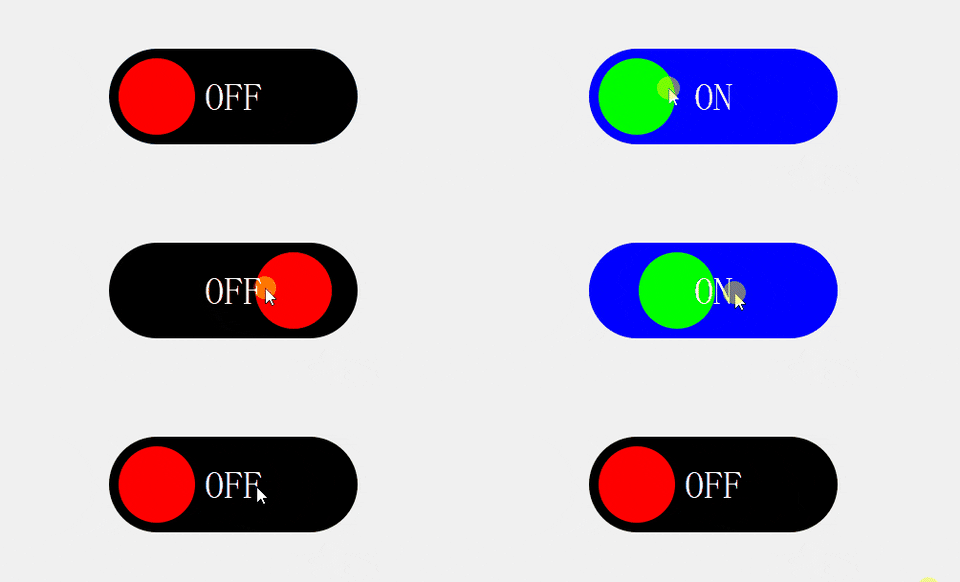
实现效果